
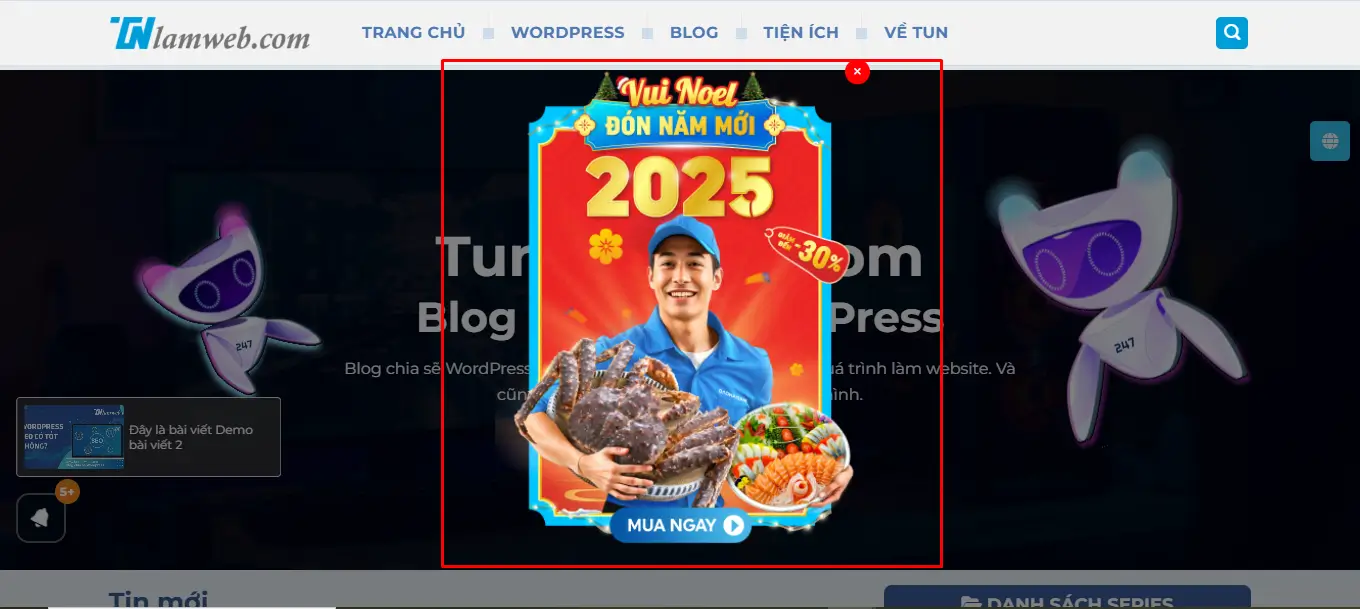
Để tạo Popup Banner ở Trang chủ hiển thị sau 3 giây khi người dùng vào trang chủ, và có nút đóng (X), bạn có thể thực hiện bằng cách thêm mã CSS, JavaScript và HTML vào theme WordPress của bạn (thông qua file functions.php và footer.php).
Thêm Popup Banner ở Trang chủ hiển thị sau 3 giây
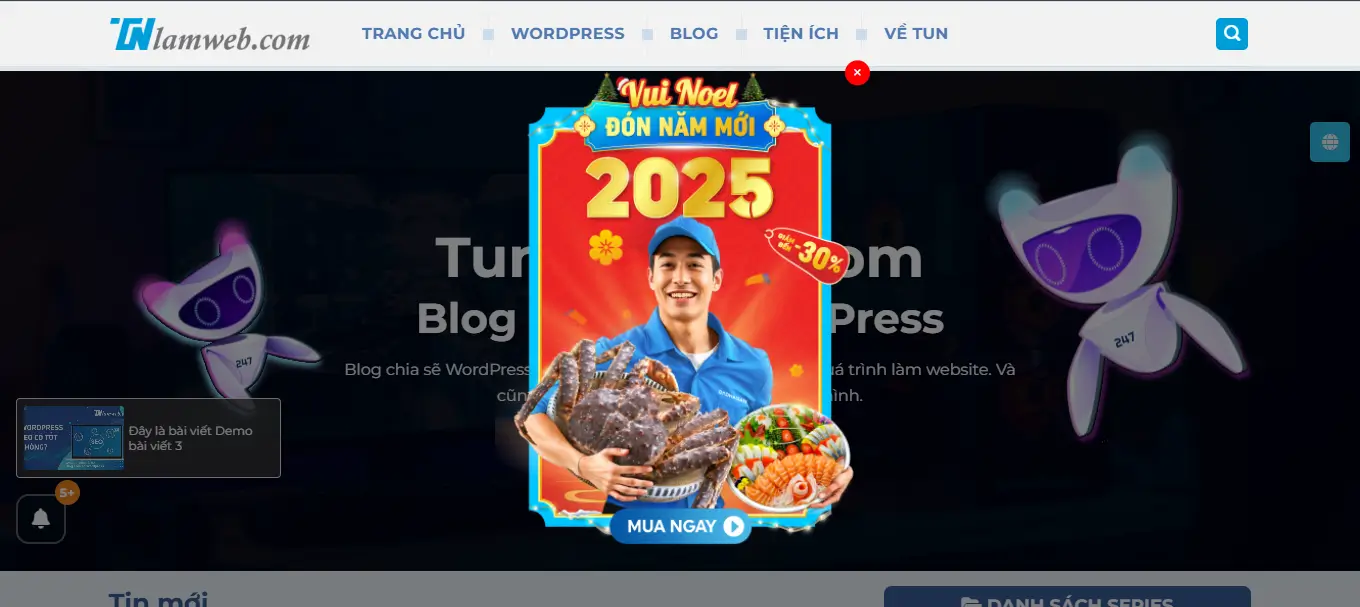
Thêm popup banner hiển thị sau 3 giây
Chèn JavaScript vào functions.php để tạo logic hiển thị popup sau 3 giây:
1 2 3 4 5 6 7 8 9 10 11 12 13 14 15 16 17 18 19 20 21 22 23 24 25 26 27 28 29 30 31 32 33 34 35 36 37 38 39 40 41 42 43 44 45 46 47 48 49 50 51 52 53 54 55 56 57 58 59 60 61 62 63 64 65 66 67 68 69 70 71 72 73 74 75 76 77 78 79 80 81 82 83 84 85 86 87 88 89 90 91 92 93 94 95 96 97 98 99 100 101 102 103 104 105 106 107 108 109 110 | // BAnner function add_popup_banner_scripts() { if (is_front_page()) { ?> <div class="popup-overlay"></div> <div class="popup-banner"> <button class="close-btn"><i class="fa-solid fa-xmark"></i></button> <div class="popup-content"> <a href="https://tunlamweb.com/" class="popup-link"> <img src="http://demo.tunlamweb.com/wp-content/uploads/2024/12/popup_collection.webp" alt="Right Ad"> </a> </div> </div> <?php } ?> <style> /* Lớp phủ nền mờ */ .popup-overlay { position: fixed; top: 0; left: 0; width: 100%; height: 100%; background: rgba(0, 0, 0, 0.5); /* Nền đen mờ */ z-index: 999; /* Phía dưới popup */ display: none; /* Ẩn mặc định */ } .popup-overlay.active { display: block; /* Hiển thị khi popup bật */ } /* Popup chính */ .popup-banner { position: fixed; top: 50%; left: 50%; transform: translate(-50%, -50%); width: 400px; background: #ffffff00; z-index: 1050 !important; display: none; border-radius: 8px; opacity: 0; transform: translate(-50%, -60%); transition: opacity 0.5s ease-out, transform 0.5s ease-out; } .popup-banner.active { display: block; opacity: 1; transform: translate(-50%, -50%); } /* Hình ảnh bên trong popup */ .popup-banner img { width: 100%; border-radius: 8px 8px 0 0; } /* Nội dung dưới hình ảnh */ .popup-content { padding: 15px; text-align: center; } /* Nút đóng */ .popup-banner .close-btn { position: absolute; top: 10px; right: 10px; background: #ff0000; border-radius: 99px; width: 25px; height: 25px; padding: 0 5px; color: #fff; border: none; cursor: pointer; text-align: center; font-size: 10px; margin: 0; } </style> <script> document.addEventListener("DOMContentLoaded", function () { const overlay = document.querySelector(".popup-overlay"); const popup = document.querySelector(".popup-banner"); const closeBtn = document.querySelector(".popup-banner .close-btn"); // Hiển thị popup và overlay sau 3 giây setTimeout(() => { overlay.classList.add("active"); popup.classList.add("active"); }, 3000); // Đóng popup và overlay khi nhấn nút X closeBtn.addEventListener("click", function () { overlay.classList.remove("active"); popup.classList.remove("active"); }); // Đóng popup khi click ra ngoài overlay overlay.addEventListener("click", function () { overlay.classList.remove("active"); popup.classList.remove("active"); }); }); </script> <?php } add_action('wp_footer', 'add_popup_banner_scripts'); |
Kiểm tra hoạt động
- Lưu các file đã chỉnh sửa (
functions.phpvàfooter.php). - Tải lại trang chủ của website.
- Đợi 3 giây, popup sẽ hiển thị với hiệu ứng mượt mà và nút đóng.
Tùy chỉnh thêm
- Nội dung: Bạn có thể thay đổi tiêu đề, nội dung và liên kết trong phần
<div class="popup-content">. - Giao diện: Điều chỉnh kích thước, màu sắc của popup trong phần CSS.
- Điều kiện hiển thị: Đảm bảo chỉ hiển thị popup trên trang chủ bằng cách sử dụng điều kiện trong PHP:
1 2 3 | if (is_front_page()) { // Thêm mã popup chỉ trên trang chủ } |
Theo dỗi tên trên Fanpage và Youtube của mình nhé.
Xem thêm bài viết khác
Chúc bạn thành công!
Nguồn ảnh: Đảo Hải Sản
 2
2  0
0