

Để lấy bài viết liên quan trong WordPress, có nhiều phương pháp bạn có thể sử dụng, như theo chuyên mục (category), theo thẻ (tag), hoặc kết hợp cả hai. Bạn có thể thực hiện việc này bằng cách thêm một truy vấn tùy chỉnh (custom query) vào tệp single.php hoặc tạo một shortcode để sử dụng linh hoạt trong các bài viết.
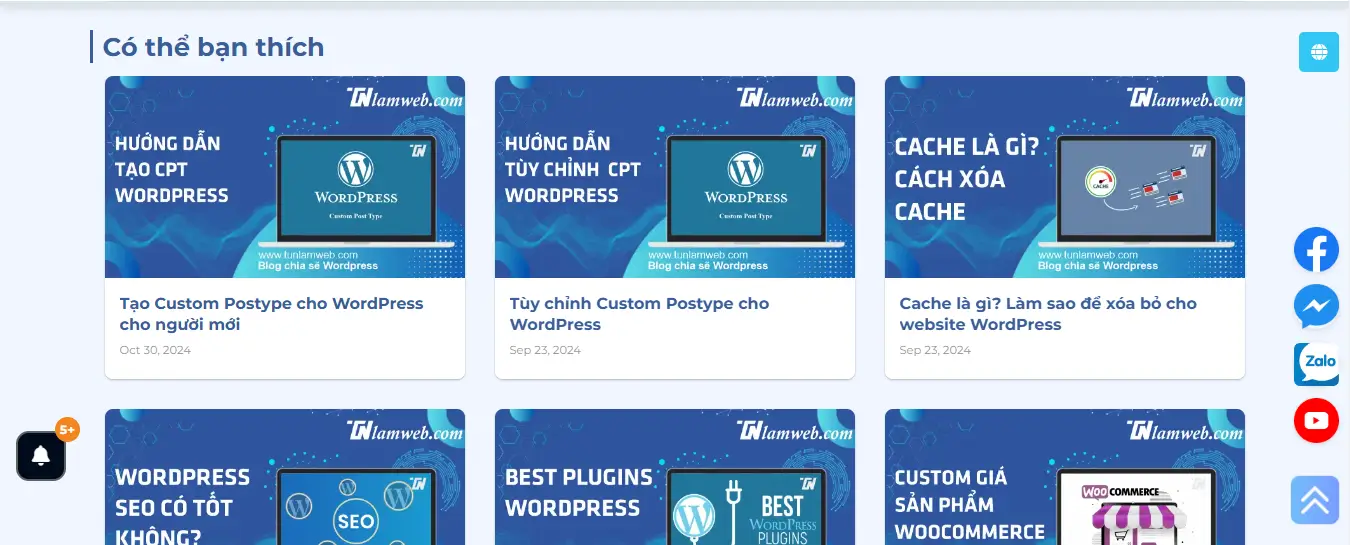
Dưới đây là các cách phổ biến để lấy bài viết liên quan trong WordPress:
Cách 1: Thêm Shortcode vào functions.php
Mở file functions.php của theme bạn đang sử dụng và thêm đoạn mã sau:
1 2 3 4 5 6 7 8 9 10 11 12 13 14 15 16 17 18 19 20 21 22 23 24 25 26 27 28 29 30 31 32 33 34 35 36 37 38 39 40 41 42 43 44 45 46 47 48 49 50 51 52 53 54 55 56 57 58 59 60 61 62 63 64 65 66 67 68 69 70 71 72 73 74 75 76 77 78 79 80 81 82 83 84 85 86 87 88 | /* * Lấy bài viết liên quan bằng shortcode * [tunlw_related_posts posts_per_page="5" title="Có thể bạn sẽ thích"] * Author: https://tunlamweb.com/ */ function tunlw_related_posts_shortcode($atts) { global $post; // Thiết lập các tham số mặc định cho shortcode $atts = shortcode_atts( array( 'posts_per_page' => 3, // Số lượng bài viết liên quan cần hiển thị 'title' => 'Bài viết liên quan' // Tiêu đề của mục bài viết liên quan ), $atts, 'tunlw_related_posts' ); // Lấy danh mục của bài viết hiện tại $categories = wp_get_post_categories($post->ID); if (!$categories) { return ''; // Nếu không có danh mục nào, trả về rỗng } // Truy vấn bài viết liên quan $args = array( 'category__in' => $categories, 'post__not_in' => array($post->ID), 'posts_per_page' => $atts['posts_per_page'], 'ignore_sticky_posts' => 1, ); $related_posts = new WP_Query($args); $output = ''; if ($related_posts->have_posts()) { $output .= '<div class="tun-lw-related-posts">'; $output .= '<div class="row large-columns-3 medium-columns-2 small-columns-1 has-shadow row-box-shadow-1 row-box-shadow-1-hover">'; $output .= '<h2>' . esc_html($atts['title']) . '</h2>'; while ($related_posts->have_posts()) { $related_posts->the_post(); $output .= '<div class="col post-item">'; $output .= '<div class="col-inner">'; $output .= '<a href="'.get_the_title().'" class="plain">'; $output .= '<div class="box box-bounce box-text-bottom box-blog-post has-hover">'; $output .= '<div class="box-image">'; $output .= '<div class="image-cover" style="padding-top:56%;">'.get_the_post_thumbnail().'</div>'; $output .= '<div class="box-text text-left">'; $output .= '<div class="box-text-inner blog-post-inner">'; $output .= '<h3 class="post-title is-large ">'.get_the_title().'</h3>'; $output .= '<div class="post-meta is-small op-8">'.get_the_time('M j, Y').'</div> '; $output .= '</div></div></div></div></a></div></div>'; } } $output .= '</div></div>'; wp_reset_postdata(); return $output; ?> <!-- Style CSS --> <style type="text/css"> .tun-lw-related-posts{ margin-top: 30px; } .tun-lw-related-posts h2 { border-left: 3px solid; padding-left: 10px; } .tun-lw-related-posts .post-title{ font-size: 16px; height: 45px; overflow: hidden; display: -webkit-box; -webkit-line-clamp: 2; line-clamp: 2; -webkit-box-orient: vertical; } .tun-lw-related-posts .box.box-bounce, .tun-lw-related-posts .post-item .col-inner { border-radius: 8px; } .tun-lw-related-posts .image-cover { border-radius: 8px 8px 0 0; } </style> <?php } add_shortcode('tunlw_related_posts', 'tunlw_related_posts_shortcode'); |
Sau khi thêm đoạn mã trên, bạn có thể sử dụng shortcode [tunlw_related_posts] trong bài viết hoặc trang nơi bạn muốn hiển thị bài viết liên quan. Shortcode này sẽ hiển thị danh sách các bài viết liên quan theo danh mục của bài viết hiện tại.
Bạn cũng có thể tùy chỉnh số lượng bài viết và tiêu đề khi sử dụng shortcode, ví dụ:
[tunlw_related_posts posts_per_page="5" title="Có thể bạn sẽ thích"]
posts_per_page: Số lượng bài viết liên quan muốn hiển thị.title: Tiêu đề của phần bài viết liên quan.
Cách 2: Hiển thị bài viết liên quan theo chuyên mục và thẻ trong single.php
Thêm đoạn mã sau vào tệp single.php (hoặc một template tùy chỉnh khác của theme) để hiển thị bài viết liên quan ngay dưới nội dung bài viết hiện tại.
1 2 3 4 5 6 7 8 9 10 11 12 13 14 15 16 17 18 19 20 21 22 23 24 25 26 27 28 29 30 31 32 33 34 35 36 37 38 39 40 41 42 43 44 45 46 47 48 49 50 51 52 53 54 55 56 57 58 59 60 61 62 63 64 65 66 67 68 69 70 71 72 73 74 75 76 | <?php /* * Lấy bài viết liên quan trong single.php * Author: https://tunlamweb.com/ */ // Lấy các chuyên mục và thẻ của bài viết hiện tại $current_post_id = get_the_ID(); $categories = wp_get_post_categories($current_post_id); $tags = wp_get_post_tags($current_post_id, array('fields' => 'ids')); // Thiết lập truy vấn bài viết liên quan $args = array( 'post_type' => 'post', 'post__not_in' => array($current_post_id), 'posts_per_page' => 5, // Số lượng bài viết muốn hiển thị 'orderby' => 'date', 'order' => 'DESC', 'tax_query' => array( 'relation' => 'OR', array( 'taxonomy' => 'category', 'field' => 'id', 'terms' => $categories, 'operator' => 'IN' ), array( 'taxonomy' => 'post_tag', 'field' => 'id', 'terms' => $tags, 'operator' => 'IN' ) ) ); $related_posts = new WP_Query($args); if ($related_posts->have_posts()) { ?> <div class="related-posts"> <h2>Bài Viết Liên Quan</h2> <div class="row large-columns-3 medium-columns-2 small-columns-1 has-shadow row-box-shadow-1 row-box-shadow-1-hover"> <?php while ($related_posts->have_posts()) { $related_posts->the_post(); ?> <div class="col post-item"> <div class="col-inner"> <a href="<?php the_permalink()?>" class="plain"> <div class="box box-bounce box-text-bottom box-blog-post has-hover"> <div class="box-image"> <div class="image-cover" style="padding-top:56%;"> <?php the_post_thumbnail(); ?> </div> div><!-- .box-image --> <div class="box-text text-center"> <div class="box-text-inner blog-post-inner"> <h3 class="post-title is-large "> <?php the_title(); ?> </h3> <div class="post-meta is-small op-8"> <?php the_time('M j, Y') ?> </div> </div><!-- .box-text-inner --> </div><!-- .box-text --> </div> </div><!-- .box --> </a><!-- .link --> </div><!-- .col-inner --> </div><!-- .col --> <?php } ?> </div> </div> <?php } wp_reset_postdata(); ?> |
Cách 3: Sử dụng Plugin Bài Viết Liên Quan
Có nhiều plugin mạnh mẽ giúp hiển thị bài viết liên quan dựa trên nội dung hoặc danh mục của bài viết. Một số plugin nổi bật mà Tunlamweb giới thiệu bao gồm:
- Yet Another Related Posts Plugin (YARPP): Đây là một plugin nổi tiếng với các tùy chọn hiển thị bài viết liên quan theo danh mục, thẻ, và nội dung của bài viết.
- Contextual Related Posts: Plugin này hiển thị bài viết liên quan dựa trên nội dung bài viết và có thể được tùy chỉnh giao diện.
- Related Posts for WordPress by Bibblio: Plugin này sử dụng thuật toán AI để phân tích và gợi ý các bài viết liên quan phù hợp nhất với người đọc.
Chúc bạn thành công.
 1
1  0
0


