

Để lấy bài viết có lượt xem nhiều nhất trong WordPress, bạn sẽ cần một giải pháp để đếm lượt xem của từng bài viết và sau đó truy vấn các bài viết dựa trên số lượt xem.
Lấy bài viết có lượt xem nhiều nhất vào widget

Dưới đây là hướng dẫn đầy đủ để bạn thực hiện:
Thêm chức năng đếm lượt xem vào bài viết
Bạn sẽ cần lưu lượt xem của bài viết. Dán đoạn code sau vào file functions.php của theme:
1 2 3 4 5 6 7 8 9 10 11 12 13 14 15 16 17 18 19 20 21 22 23 24 25 26 27 28 29 30 31 32 33 34 35 36 | //Đếm lượt xem cho bài viết function getPostViews($postID, $is_single = true){ global $post; if(!$postID) $postID = $post->ID; $count_key = 'post_views_count'; $format_count = get_post_meta($postID, $count_key, true); $count = format_views($format_count); if(!$is_single){ return '<span class="svl_show_count_only">'.$count.'</span>'; } $nonce = wp_create_nonce('devvn_count_post'); if($count == "0"){ delete_post_meta($postID, $count_key); add_post_meta($postID, $count_key, '0'); return '<span class="svl_post_view_count" data-id="'.$postID.'" data-nonce="'.$nonce.'">0 lượt xem</span>'; } return '<span class="svl_post_view_count" data-id="'.$postID.'" data-nonce="'.$nonce.'">'.$count.' lượt xem</span>'; } // getPostViews(get_the_ID()); function setPostViews($postID) { $count_key = 'post_views_count'; $count = get_post_meta($postID, $count_key, true); if($count == "0" || empty($count) || !isset($count)){ add_post_meta($postID, $count_key, 3000); update_post_meta($postID, $count_key, 3000); }else{ $count++; update_post_meta($postID, $count_key, $count); } } function tunlw_count(){ if ( is_single() ) : setPostViews(get_the_ID()); endif; } add_action( 'flatsome_after_header', 'tunlw_count' ); |
Xem thêm: Hiển thị danh mục con trong danh mục cha ở Category
Hiển thị danh sách bài viết có lượt xem nhiều nhất

Dùng WP_Query để truy vấn các bài viết có lượt xem cao nhất dựa trên Meta Key. Dán đoạn code này vào nơi bạn muốn hiển thị danh sách bài viết:
Hiển thị lượt xem trên bài viết trên widget
Nếu bạn muốn hiển thị số lượt xem trên từng bài viết, thêm đoạn code sau vào functions.php
1 2 3 4 5 6 7 8 9 10 11 12 13 14 15 16 17 18 19 20 21 22 23 24 25 26 27 28 29 30 31 32 33 34 35 36 37 38 39 40 41 42 43 44 45 46 47 48 49 50 51 52 53 54 55 56 57 58 59 60 61 62 63 64 65 66 67 68 69 70 71 72 73 74 75 76 77 78 79 80 81 82 83 84 85 86 87 88 89 90 91 92 | /* * Tạo widget hiển thị bài xem nhiều */ function create_topview_widget() { register_widget( 'TopView_Widget' ); } add_action( 'widgets_init', 'create_topview_widget' ); class TopView_Widget extends WP_Widget { //Thiết lập tên widget và description của nó (Appearance -> Widgets) function __construct() { $options = array( 'classname' => 'topview', 'description' => 'Xem bài viết xem nhiều nhất' ); $this->WP_Widget('topview', 'Top View', $options); } //Tạo form điền tham số cho widget //ở đây ta có 3 form là title, postnum (số lượng bài) và postdate (tuổi của bài function form($instance) { $default = array( 'title' => 'Bài xem nhiều nhất', 'postnum' => 5, 'postdate' => 30 ); $instance = wp_parse_args( (array) $instance, $default ); $title = esc_attr( $instance['title'] ); $postnum = esc_attr( $instance['postnum'] ); $postdate = esc_attr( $instance['postdate'] ); echo "<label>Tiêu đề:</label> <input class='widefat' type='text' name='".$this->get_field_name('title')."' value='".$title."' />"; echo "<label>Số lượng bài viết:</label> <input class='widefat' type='number' name='".$this->get_field_name('postnum')."' value='".$postnum."' />"; echo "<label>Độ tuổi của bài viết (ngày)</label> <input class='widefat' type='number' name='".$this->get_field_name('postdate')."' value='".$postdate."' />"; } //Cập nhật dữ liệu nhập vào form tùy chọn trong database function update($new_instance, $old_instance) { $instance = $old_instance; $instance['title'] = strip_tags($new_instance['title']); $instance['postnum'] = strip_tags($new_instance['postnum']); $instance['postdate'] = strip_tags($new_instance['postdate']); return $instance; } function widget($args, $instance) { global $postdate; // Thiết lập biến $postdate là biến toàn cục để dùng ở hàm filter_where extract( $args ); $title = apply_filters( 'widget_title', $instance['title'] ); $postnum = $instance['postnum']; $postdate = $instance['postdate']; echo $before_widget; echo '<div class="title_topview"><h2><i class="fa-solid fa-fire"></i> '; echo $before_title.$title.$after_title.'</h2></div>'; $query_args = array( 'posts_per_page' => $postnum, 'meta_key' => 'post_views_count', //post_views_count postview_number 'orderby' => 'meta_value_num', 'order' => 'DESC', 'ignore_sticky_posts' => -1 ); $postview_query = new WP_Query( $query_args ); // remove_filter( 'posts_where', 'filter_where' ); // Xóa filter để tránh ảnh hưởng đến query khác if ($postview_query->have_posts() ) : $i = 0; echo "<ul>"; while ( $postview_query->have_posts() ) : $postview_query->the_post(); $i++; ?> <li> <div class="flex-row"> <div class="flex-col flex-grow"> <a href="<?php the_permalink(); ?>"> <div class="post-items post-wg"> <div class="box box-vertical"> <div class="list-number"> <span>Top </br> <?php echo $i; ?></span> </div> <div class="box-text"> <h3 class="post-title <?php echo $title_style;?>"><?php the_title(); ?></h3> <div class="post-ot"> <span class="post_author"> <?php echo esc_html( get_the_author_meta( 'display_name' ) ); ?> </span> <div class="post_view"><?php echo '<i class="fas fa-eye"></i> '.getPostViews(get_the_ID()); ?></div> </div> </div> </div> </div> </a> </div> </div><!-- .flex-row --> </li> <?php endwhile; echo "</ul>"; endif; echo $after_widget; } } |
Tùy chỉnh giao diện với CSS
Thêm CSS vào file style.css để giao diện hiển thị đẹp hơn:
1 2 3 4 5 6 7 8 9 10 11 12 13 14 15 16 17 18 19 20 21 22 23 24 25 26 27 28 29 30 31 32 33 34 35 36 37 38 39 40 41 42 43 44 45 46 47 48 49 50 51 52 53 54 55 56 57 58 59 60 61 62 63 64 65 66 67 68 69 70 71 72 73 74 75 76 77 78 79 80 81 82 83 84 85 86 87 | span.widget-title { font-size: 18px; font-weight: 600; } .post_tags_widget h2{ text-align: center; } aside#topview-2, #text-3 { border: 1px solid #dadada; border-radius: 8px; padding: 15px 5px; background: white; } #text-3 .box-tags{ max-height: 350px; overflow-y: auto; } #topview-2 h2{ text-align: center; } #topview-2 .box-image img { width: 80px; height: 55px; object-fit: cover; border-radius: 4px; } #topview-2 .box-vertical .box-image { width: 30% } #topview-2 .box.box-vertical { display: flex; align-items: center; } #topview-2 .list-number span { margin: 15px; width: 45px; height: 45px; position: relative; background-color: var(--secon-color); color: #fff; display: flex; align-items: center; justify-content: center; border-radius: 50%; z-index: 6; font-size: 12px; font-weight: 600; text-align: center; animation: play 2s ease infinite; } @keyframes play { 0% { transform: scale(1); } 15% { box-shadow: 0 0 0 2px rgba(0, 0, 0, 0.4); } 25% { box-shadow: 0 0 0 4px rgba(0, 0, 0, 0.4), 0 0 0 10px rgba(0, 0, 0, 0.2); } 25% { box-shadow: 0 0 0 6px rgba(0, 0, 0, 0.4), 0 0 0 14px rgba(0, 0, 0, 0.2); } } #topview-2 .box-text { padding: 5px !important } #topview-2 .box.box-vertical { padding: 0; border: none; border-radius: unset; } #topview-2 .post-title { font-size: 14px !important; margin-bottom: 5px !important; display: -webkit-box; -webkit-line-clamp: 2; -webkit-box-orient: vertical; overflow: hidden; margin-bottom: 3px } #topview-2 .post-ot { font-size: 12px; margin-top: 0; display: flex; justify-content: space-between; } |
Kết quả
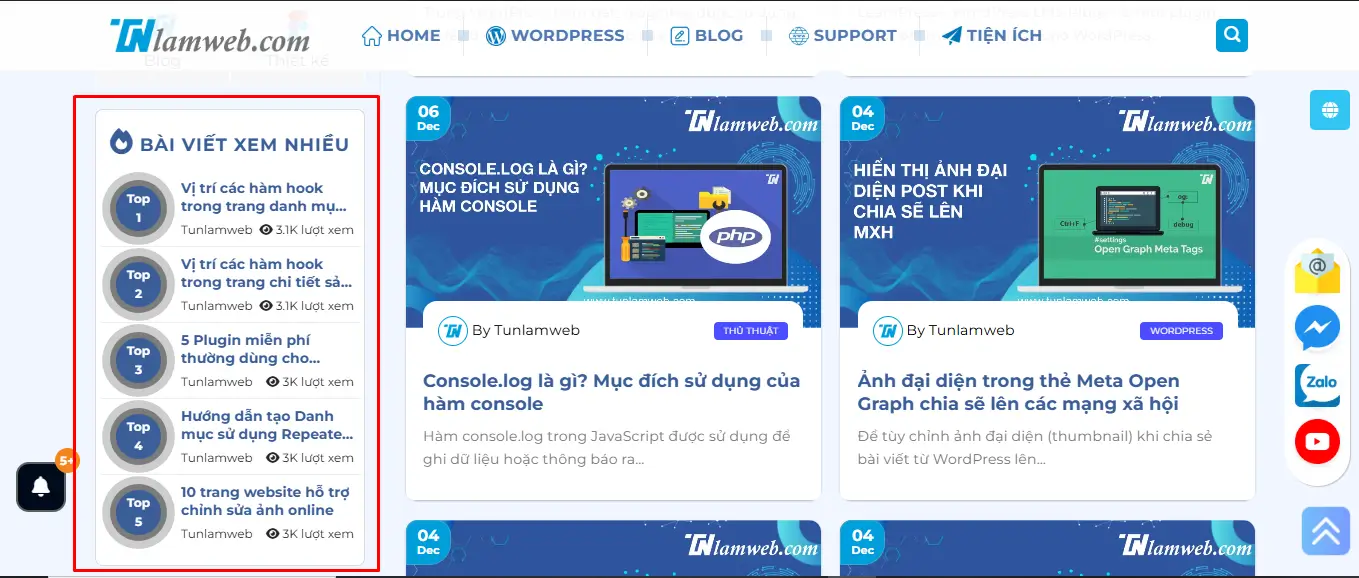
Bạn có thể hiển thị danh sách các bài viết xem nhiều nhất theo thứ tự giảm dần.
Giao diện danh sách bài viết có thể tùy chỉnh với CSS.
Lưu ý
- Nếu bạn sử dụng plugin cache như WP Super Cache hoặc W3 Total Cache, bạn cần cấu hình để không lưu cache trang bài viết nếu muốn đếm lượt xem chính xác.
- Bạn cũng có thể tích hợp Google Analytics để thống kê lượt xem chuyên sâu hơn.
Nếu cần hỗ trợ thêm, đừng ngần ngại cho tôi biết.
Theo dỗi tên trên Fanpage và Youtube của mình nhé.
Chúc bạn thành công.
 0
0  0
0